Midarion Casino login – Sign In & Start Playing
If you are ready to jump into slots, live tables, or a quick sports bet, logging in at Midarion Casino only takes a few clicks. You will just need your email, password, and one short email confirmation to get started.
What Is Midarion and Why Create an Account
Midarion is an online casino and sportsbook where you can switch between casino games, live casino, jackpots, sports, and virtual sports under one account. You will see separate sections for Casino, Live Casino, Jackpots, Sports, Live Betting, and Virtual Sports right in the main menu.
Having an account unlocks the full lobby, including thousands of slots, table games, game shows, and live dealer tables. You also get access to promotions, tournaments, VIP levels, challenges, and a built-in Shop where you can redeem rewards from your play.
Here is what you get once you sign up at Midarion Casino:
- One wallet for casino, live casino, jackpots, and sports betting under the same Midarion login.
- Casino Welcome Package up to €3,000 plus 350 free spins and 1 Bonus Crab if you choose the casino bonus during Midarion Casino sign up.
- Separate sports welcome offer where you can get a 100 percent bonus on your first sports deposit.
- Access to all promotions like tournaments, challenges, cashback-style perks, and other time-limited offers.
- Entry to the VIP levels section, where your play can unlock better benefits over time.
Bottom line, if you are going to play more than a couple of demo rounds, it makes sense to create a real account so your progress, bonuses, and rewards actually stick.
How to Register at Midarion
You can start registration straight from the big “Join now” or “Register” buttons at the top of the Midarion homepage. The process is broken into simple steps so you can finish in under a minute if you have your details handy.
Step 1 – Enter Your Personal Details
First, you will land on the bonus selection and basic details screen. Here, you choose whether you want the casino welcome package, the sports bonus, enter a promo code, or continue with no bonus at all.
Once you continue, the personal details form will ask you for:
- First and last name exactly as on your ID document.
- Date of birth in day, month, year format to confirm you are over 18.
- Sex selection, typically male or female, as shown on the form.
- Country, city, full address, and postcode for residency checks and payments.
- Mobile phone number with country code so we can reach you if needed.
Make sure everything is accurate, since the same data will be used later in verification checks and withdrawals.
Step 2 – Set Your Login Credentials
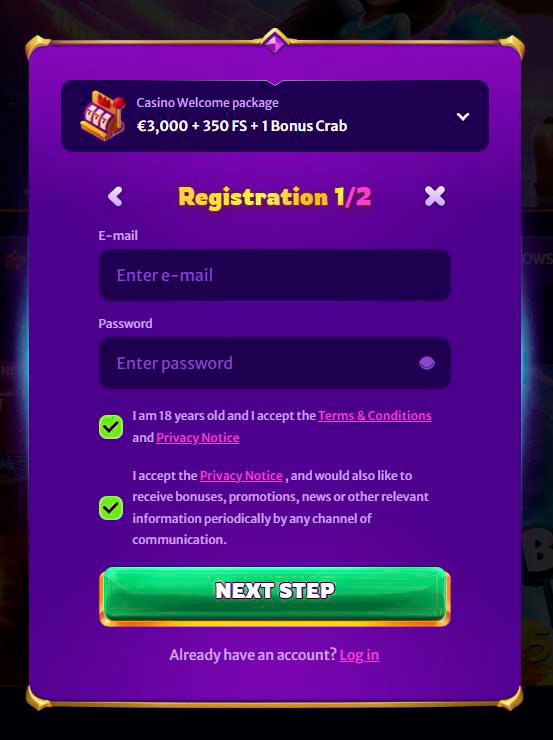
On the first Midarion Casino sign-up step you will set up your main login info. You create this right above the checkboxes for age confirmation and terms.
You will need to:
- Enter your email address, which becomes your primary Midarion login.
- Choose a secure password with a mix of characters that you can still remember.
- Confirm that you are at least 18 years old and accept the Terms, Conditions, and Privacy Notice.
- Optionally tick a box to receive promotions, bonuses, and news by email or other channels.
Once that is done, you click “Next step” to move on or log in to Midarion if you already registered before.
Step 3 – Confirm Your Email
After submitting the form, you will receive an email to the address you used during registration. Inside, you will find a link to confirm your account so the system knows the email really belongs to you.
Here is what usually happens at this stage:
- You open the confirmation email sent to your registered address.
- You follow the link to activate your Midarion account.
- Once confirmed, you can log in, claim your chosen welcome offer, and access deposits and full game play.
If the email is missing, check your spam or promotions folder, then contact support if you still cannot find it.
How to Log In to Midarion Casino
Now that you have an account, logging in to Midarion Casino is quick both on desktop and mobile. You always sign in using the same email and password you set during registration.
Logging In on Desktop
On the desktop, you will see the “Log in” button in the Midarion Casino header of the site next to “Register.” Clicking it opens the Midarion Casino login window on top of the lobby.
To sign in on desktop, you simply:
- Click the “Log in” button in the top navigation bar.
- Enter the email address you used when you created your account.
- Enter your password in the password field.
- Confirm and wait a moment while the system loads your balance and profile.
After Midarion Casino login, the header switches to show your balance, Shop button, profile menu, and quick links to casino, sports, payments, and more.
Logging In on Mobile (PWA Shortcut)
On mobile, the layout is compact, but the login button is still fixed in the header area. You tap it, the same login form slides up, and you sign in with your email and password just like on a desktop.
Midarion also lets you create a Progressive Web App-style shortcut on your phone:
- On iOS and Android, there is a “Create Shortcut” / “Add to Home Screen” style option described in the Create Shortcut help section.
- Once you add it, you can open Midarion from your home screen like a normal app.
- The PWA uses your mobile browser session, so your login details and balance stay synced with the main site.
This way, you get app-like access without downloading anything from an app store.
Account Verification (KYC)
Now, let us talk about verification, since you will almost certainly hit this step before bigger withdrawals. Midarion follows standard KYC rules that require you to verify your identity, age, and sometimes your payment methods.
Why Verification Is Required
Verification is there to protect both you and the casino, not just to be annoying. It helps us confirm that the account really belongs to you, that you are over 18, and that the funds on the account come from legal sources.
Under the general terms:
- You must provide information and documents so we can manage your account and verify your identity and source of funds.
- Midarion can run additional checks before and after deposits or withdrawals if needed, using KYC procedures.
- If the required documents are not provided within 30 days, the account can be suspended and payments withheld until everything is received.
- Usually, we aim to verify documents within about 10 days after you submit them, although complex cases can take longer.
All of this is done in line with our security, anti-fraud, and regulatory obligations.
Documents Needed to Verify Your Account
To pass KYC, Midarion might ask you to upload or send copies of several types of documents. They always have to be clear, valid, and show the necessary information.
Typical Midarion verification documents include:
- Government ID such as a passport, ID card, or driver’s license to confirm your name, age, and photo.
- Proof of address, like a utility bill or bank statement, showing your full name and residential address.
- Proof of payment method ownership, such as card statements or screenshots, or bank statements for bank transfers.
- Additional checks, for example, phone calls, face verification, or identity service checks, if needed to confirm you are the legitimate account holder.
Midarion can also use trusted third-party providers for identity checks, always in line with the Privacy Policy.
Account Security & Recovery
Once your account is verified and funded, you really do not want anyone else touching it. Midarion’s terms put security responsibilities both on you and on us as the account holder.
Changing Your Password
You should change your password if you ever think someone else might know it. You can also just do it periodically to keep things tighter.
Based on the rules:
- You must keep your login and password confidential and never share them with anyone.
- Any action on your account after the correct login and password are entered is treated as if it were done by you.
- You should keep your account details up to date, which includes updating your email and password if needed.
If you suspect someone else might have access, change the password immediately and contact support so they can review activity on your account.
Recovering Access to Your Account
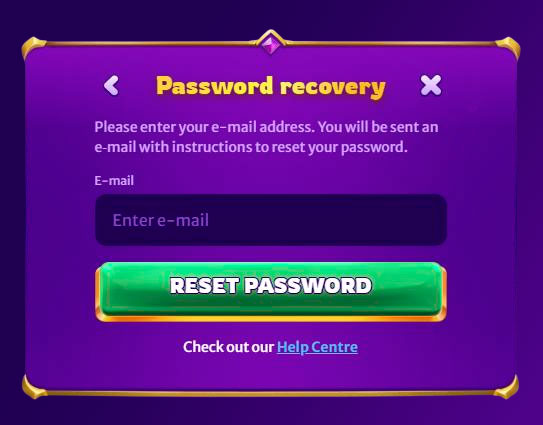
If you forget your password or have trouble logging in, there are built-in recovery tools plus support backup. You will usually see a “Forgot your password?” link on the login window.
To get back into your account, you can:
- Use the “Forgot your password?” option on the Midarion Casino login screen to reset access via your registered email.
- Contact customer support if you forgot the email or username you used at registration.
- Follow the troubleshooting steps suggested in the “I am having trouble logging into my account” article in the help center if basic fixes do not work.
Support can guide you through additional Midarion verification to make sure they are dealing with the real account owner.
Getting Help from Support
Whenever you are stuck at login, registration, or verification, Midarion’s support team is easy to reach. Customer support is described as ready to help you 24/7 in the help center.
You can contact support via:
- Live Chat is available through a dedicated button both in the help center and in the footer area.
- Email support@midarion.com for general issues, including login, account access, and technical problems.
- Additional complaint-specific email complaintsmidarion.com if you ever need to escalate a more serious dispute.
If you want quick help with logging in or resetting your password, live chat is usually the fastest route.

FAQ
Each player can only create one account, and duplicate accounts may be closed with promotions and winnings voided.
You might be in an excluded jurisdiction like Romania, the United States, the United Kingdom, or other listed countries where accounts are not allowed. You also must be at least 18 years old and provide correct personal details.
If you cannot remember your login email or username, you should contact customer support for assistance, and they will help you recover access after confirming your identity.
Use the “Forgot your password?” link on the login page to reset it via email, or contact support if the link does not solve the issue.
Once you submit all the requested documents, Midarion usually reviews them within about 10 days, although complex cases may require extra time.
Yes, the company reserves the right to deny opening an account or close an existing one without prior notice if terms are breached or regulatory reasons require it.